
Share cookie lets you create an online link containing encrypted cookies. Recipients open the link, enter the password, and import cookies into their browser — the server never sees the password or plaintext cookies.
Requirements
| Requirement | Details |
|---|---|
| Signed in | Cookie Editor account (Google OAuth) |
| Standard plan | Share is not available on the Free plan |
| Cookies on page | The active tab must have cookies to share |
If you are not signed in, the extension prompts you to open cookieeditor.org/login. Free users see an upgrade prompt for Standard.
Create a share link
- Open the side panel on the page you want to share cookies from.
- Click Share (up arrow with link icon) in the top toolbar.
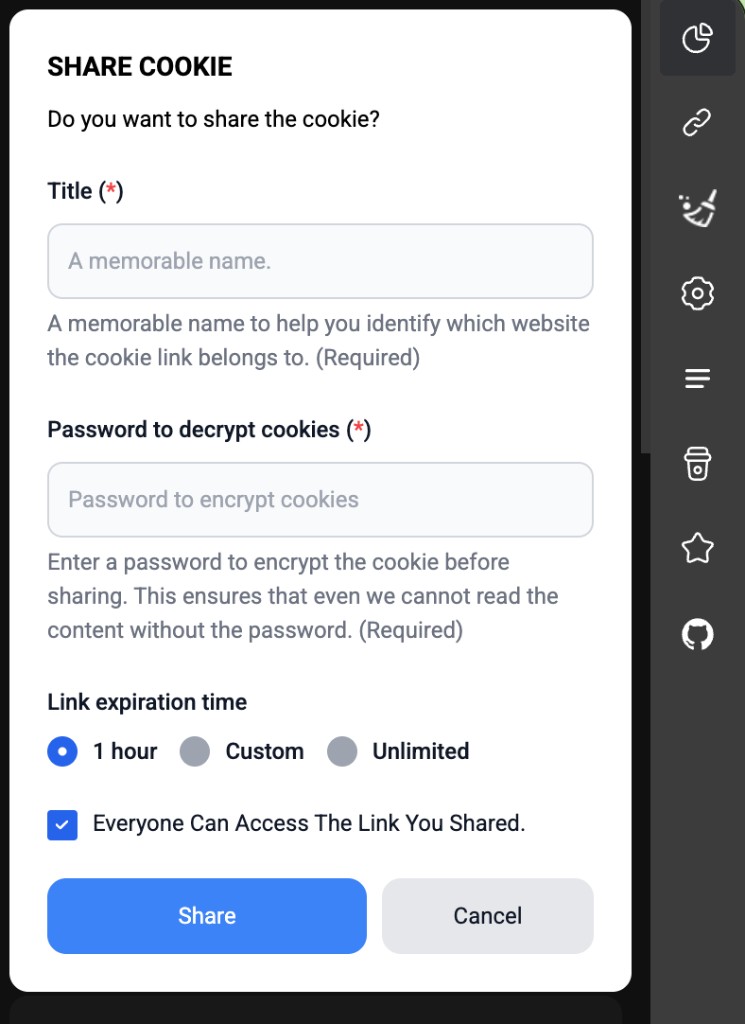
- Fill in the SHARE COOKIE form:
| Field | Required | Description |
|---|---|---|
| Title | Yes | A label for the link |
| Password to encrypt | Yes (≥ 8 chars) | Password the recipient needs to import |
| Link expiration | Yes | 1 hour / Custom (number + h,d,m,y) / Unlimited |
| Public link | No | When on, anyone with the link can import |
- Click Share.
- The extension uploads encrypted cookies to the server and returns a link like
https://cookieeditor.org/cookie/link/{uuid}. - The Links tab opens so you can manage the new link.
How encryption works
cookies → JSON.stringify → base64 → AES encrypt (password) → upload to server
- Password is never sent to the server.
- The server only stores the encrypted blob.
- Only someone with the password can decrypt it.
Send the link to someone else
Copy the link from the Links tab or from the success message:
https://cookieeditor.org/cookie/link/550e8400-e29b-41d4-a716-446655440000
Send the link and password over separate private channels — do not post the password publicly with the link.
Recipient import flow
- Install Cookie Editor.
- Open the share link in Chrome.
- The extension opens the import page.
- Enter the password and click Import.
- Cookies are set in the browser and you are redirected to the target domain.
Manage shared links
The Links tab (sidebar) lists your share links:
- Copy link — copy URL to clipboard
- View details — domain, title, expiration
- Import — import the link on your own machine
- Delete — remove the link from the server
Related API (website)
| Endpoint | Description |
|---|---|
POST /api/cookie/share |
Create a share link (called by extension) |
GET /api/cookie/{uuid}/info |
Metadata + encrypted blob |
GET /api/cookie/list |
List user's share links |
POST /api/cookie/{uuid}/delete |
Delete a share link |
Next steps
Next
Use with n8n